Admin settings
This is a collection of settings stored in the database that are
manually edited through the Django admin dashboard found at
/database sub-directory.
For the production deployment it can be found at https://monitor.sns.gov/database You are required to be a superuser to modify the settings, see Users.
Active Instrument
URL: https://monitor.sns.gov/database/dasmon/activeinstrument/
Some options can be modified in the full list, but clicking on the ID for the instrument allows for modifying the state of the following values
Is aliveAn instrument can be hidden from the Web Monitor by deselecting thisIs aliveoption in the model. This is useful to hide testing or fake instruments.Is adarafor instruments that have switched to the adara DASHas pvsdfor instruments that have pvstreamerHas pvstreamerwhich is not turned on for instruments and appears to be covered by theHas pvsdparameter already
Choice
URL: https://monitor.sns.gov/database/reduction/choice/
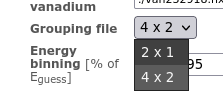
The Choice model controls selection options for instrument
reduction templates.
e.g. the arcs.grouping properties

corresponds to the Grouping File selection at
https://monitor.sns.gov/reduction/arcs/
Monitored Variables
URL: https://monitor.sns.gov/database/pvmon/monitoredvariable/
The Monitored Variable model control which PVs appear on the
instrument status page. To promote a PV from the PV page to the status
page just create a model with the correct Instrument and PV
Name. To remove a PV from the status page just delete that model.
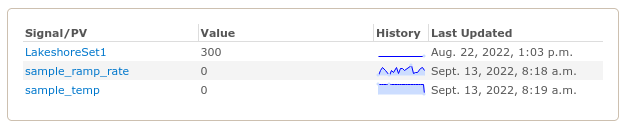
For example, the following Monitored Variables exist for TOPAZ,
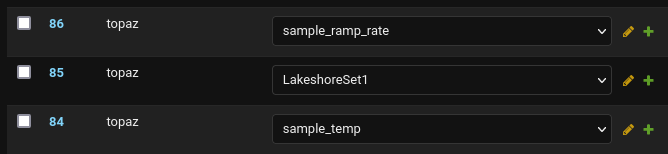
which results in the following PVs appearing on https://monitor.sns.gov/dasmon/topaz/
PV
Name
URL: https://monitor.sns.gov/database/pvmon/pvname/
A PV Name model is created whenever a new PV is received. By
default it will be visible on the instrument PVs page but if you
deselect the MONITORED on a particular PV Name it will no
longer be visible.
Users
URL: https://monitor.sns.gov/database/auth/user/
This allows you to control who is staff or superuser. Being a superuser gives you access to the admin settings while being staff gives you access to the Admin View.